Thank you for your patience while we retrieve your images.
Taken 9-Jul-15
Visitors 27


32 of 37 photos
Thumbnails
Info
Categories & Keywords

Category:
Subcategory:
Subcategory Detail:
Keywords:2015, Tour, Tour de France, stage 6, Dieppe, Martin Eglise, Abbeyville, Le Havre, Martin, Tony Martin, Cav, Cavendish, Mark Cavendish, ettixx, quick step, team, France, Normandy, cycling, photoshop, race, road, topaz, cycle, bike, bicycle, le tour, lens, sony, tamron, a700, speed, cycle race, racing, effort, action, sport, blur, movement, zoom, lens effects, yellow, yellow jersey, blue
Photo Info

Dimensions5340 x 3560
Original file size9.61 MB
Image typeJPEG
Color spacesRGB
Date taken9-Jul-15 13:30
Date modified26-Jul-15 10:41
Shooting Conditions

Camera makeSONY
Camera modelDSLR-A700
Focal length150 mm
Focal length (35mm)225 mm
Max lens aperturef/5.6
Exposure1/1600 at f/6.3
FlashNot fired, compulsory mode
Exposure bias0 EV
Exposure modeAuto
Exposure prog.Shutter priority
ISO speedISO 640
Metering modePattern
Digital zoom0x
Tour de France Dieppe Corner

Tour de France Dieppe Corner

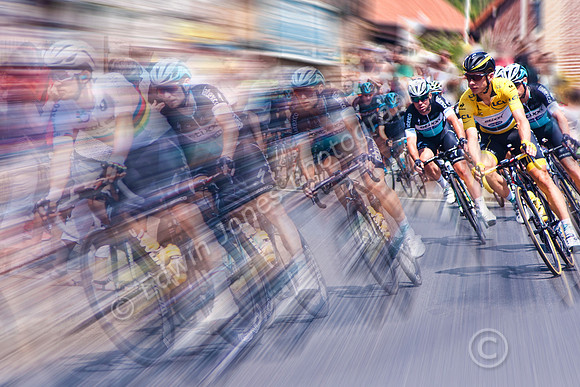
This is another shot from my 10 day trip taking in some of the Tour de France stages in northern France. This was Stage 6 from Abbeyville to Le Havre. This one was taken on a corner at the small village of Martin Eglise just before Dieppe and about half way into the Stage. The rider in yellow, the race leader at the time is Tony Martin who crashed at the end of the stage and broke his collarbone. As a result Chris Froome took back the Yellow Jersey at the end of the following days race. The rider just behind and to the left of Tony Martin in the picture is Mark Cavendish.

The picture was taken handheld with a Sony A700 with a Tamron 28-200mm zoom at 150mm. Edits were carried out in RAW to improve clarity and Vibrance. Further adjustments were made using Topaz Adjust plus adjustment layers for Vibrance and Saturation.

Next he image was adjusted in Topaz lens effects to add a zoom blur. The zoom centre was fixed on the Tony Martin’s face. The effect was applied on a duplicate layer and a layer mask. A brush was then used to exclude more of the cyclist. The big advantage of a layer mask is the ability to precisely control how much of the effect to apply to each part of the picture by using a brush on the mask with different opacity. For example the leads cyclists were originally not visible through the zoom effect. A brush at about 40% opacity was used to remove enough of the zoom to allow their shapes to appear without distracting too much from the main cyclists.

For Galleries, Prints and Licences see <b><a href="http://edwinjonesphotography.com">Edwin Jones Photography</a></b>

For my Photography books see <b><a href="http://www.amazon.com/Edwin-Jones/e/B00CH06KSC/ref=ntt_athr_dp_pel_pop_1">My Author Page USA</a></b> or <b><a href="http://www.amazon.co.uk/Edwin-Jones/e/B00CH06KSC/ref=ntt_athr_dp_pel_1">My Author Page UK</a></b>

Please visit my </a></b> │ <b><a href="https://www.facebook.com/edwinjonesphoto">Facebook Page</a></b>