Thank you for your patience while we retrieve your images.
Taken 8-Dec-14
Visitors 104


62 of 157 photos
Thumbnails
Info
Categories & Keywords

Category:
Subcategory:
Subcategory Detail:
Keywords:london, England, uk, Britain, canary wharf, poplar, movement, shutter speed, motion blur, lights, false hdr, photography, photos, photo, picture, pictures, sony, dlr, rail, pic, high dynamic range, photomatix, tonemapped, dslra700, sigma, color, colour, concrete, train, underground, metro, urban, docklands, docklands light railway, dark, darkness, night, road, light trails, traffic trails, long exposure, capital, perspective, cities, wide angle, structure, londres, transport, transportation, motion, blur, speed, topaz, red%d office, skyscrapers
Photo Info

Dimensions5340 x 3560
Original file size7.82 MB
Image typeJPEG
Color spacesRGB
Date taken8-Dec-14 17:45
Shooting Conditions

Camera makeSONY
Camera modelDSLR-A700
Focal length15 mm
Focal length (35mm)22 mm
Max lens aperturef/2.1
Exposure6s at f/11
FlashNot fired, compulsory mode
Exposure bias0 EV
Exposure modeAuto
Exposure prog.Aperture priority
ISO speedISO 100
Metering modePattern
Digital zoom0x
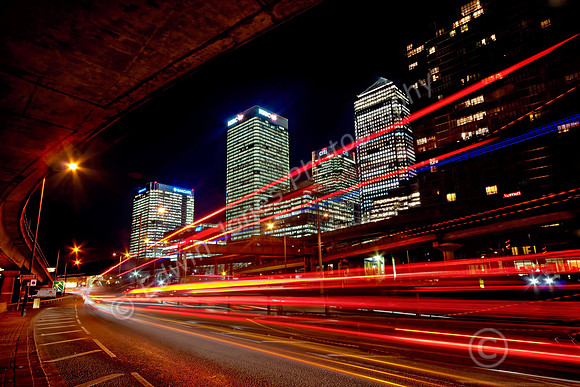
Canary Wharf Traffic Trails

Canary Wharf Traffic Trails

This viewpoint is not often seen as it is not very pedestrian friendly. However it is a short walk from Poplar Docklands Light Rail Station immediately north of the Canary Wharf commercial district. The construction above is a flyover for the DLR trains.

The picture was taken with a Sony A700 with a Sigma 10-20 wide angle zoom at 15mm. The shutter speed was 6 seconds to capture the light trails and an aperture of f11 gained the star effects in the lights. Taken with a tripod in RAW. The image was opened in Camera Raw and 2 additional images were created at =2EV and -2Ev for a “false HDR”

Outputted in Photomatix on fusion settings for a natural look for an HDR. The minus 2EV image was copied in as a new layer and masked off except for the bright areas to tone them down. The plus 2 EV image was brought in and masked off except the darker areas where a brush at low opacity was used to bring in a little more detail.

I used Topaz DeNoise and Topaz detail plus Topaz Glow at 17% to subtly, Selective contrast and sharpening was used with masks up some areas.