Thank you for your patience while we retrieve your images.
Taken 20-Sep-14
Visitors 69


82 of 157 photos
Thumbnails
Info
Categories & Keywords

Category:
Subcategory:
Subcategory Detail:
Keywords:county, city, uk, england, house, abstract, london, tower, art, geometric, lines, thames, architecture, modern, river, lens, spiral, open, angle, city hall, interior, curves, wide, shapes, symmetry, south bank, staircase, gb, boris, curve, city of london, city hall london, people, urban, black and white, bw, perspective, line, fisheye, Norman foster, open house, southwark, offices, spiral staircase, gla, office, Sony, pic, dslr, hdr, high dynamic range, photomatix, topaz, tonemapped, dslra700, tonemapping, futuristic, samyang
Photo Info

Dimensions5340 x 3560
Original file size10.6 MB
Image typeJPEG
Color spacesRGB
Date taken20-Sep-14 09:21
Shooting Conditions

Camera makeSONY
Camera modelDSLR-A700
Max lens aperturef/1
Exposure1/60 at f/1
FlashNot fired, compulsory mode
Exposure bias0 EV
Exposure modeAuto bracket
Exposure prog.Aperture priority
ISO speedISO 800
Metering modeCenter-weighted average
Digital zoom0x
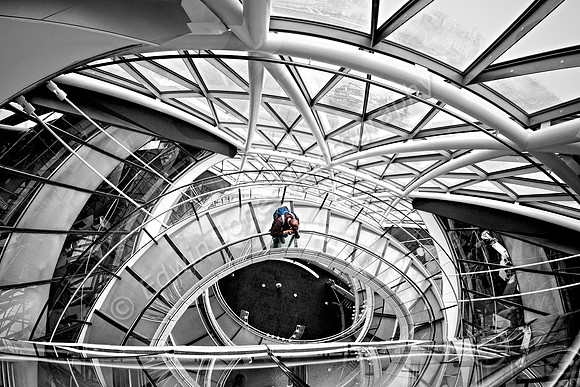
Circles Down City Hall

Circles Down City Hall

I visited City Hall again this year for Open House. The shots were however a little disappointing compared to last year as there was a longer queue when we arrived and the ramp down was much more crowded. I decided to use one of the many unprocessed shots from last year for today’s picture
The picture was taken handheld with a Sony A700 with a Samyang 8mm fisheye lens. The HDR this time was done manually with one image at 0EV having exposure adjusted in camera raw and the then pasted in as a new layer and a layer mask and brush used to bring out the outside areas. The Plus 2 EV was pasted in and used to brighten up some of the interior.

More detail was brought in using Topaz Clarity and noise reduced using Topaz DeNoise. Finally a clarity effect using Unsharp mask and settings of amount 26 and radius 26. This has the effect of bringing in more punch and contrast. The mono conversion was done with Topaz B&W Effects 2 applied on a layer with a mask and a brush used to bring in the selective colour on the Photographer.

A slight vignette was applied using the finishing touches in Topaz Adjust.