Thank you for your patience while we retrieve your images.
Taken 13-Apr-17
Visitors 9


49 of 52 photos
Thumbnails
Info
Categories & Keywords

Category:
Subcategory:
Subcategory Detail:
Keywords:Chichester, Chichester University, Bishops Otter, campus, Sussex, gardens, West Sussex, England, UK, Britain, Europe, flowers, yellow, flower, red, dof, depth of field, focus, sharp, macro, stacked, focus stacked, focus stacking, park, nature, spring, April, background, 80mm, zoom, lens, sigma, Sony, sun, light, colour, color, pic, dslr, topaz, dslra550, photoshop
Photo Info

Dimensions5899 x 3930
Original file size9.15 MB
Image typeJPEG
Color spacesRGB
Date taken13-Apr-17 17:58
Shooting Conditions

Camera makeSONY
Camera modelDSLR-A550
Focal length80 mm
Focal length (35mm)120 mm
Max lens aperturef/5.6
Exposure1/160 at f/7.1
FlashNot fired, compulsory mode
Exposure bias0 EV
Exposure modeAuto
Exposure prog.Aperture priority
ISO speedISO 800
Metering modePattern
Springtime at Chichester University

Springtime at Chichester University

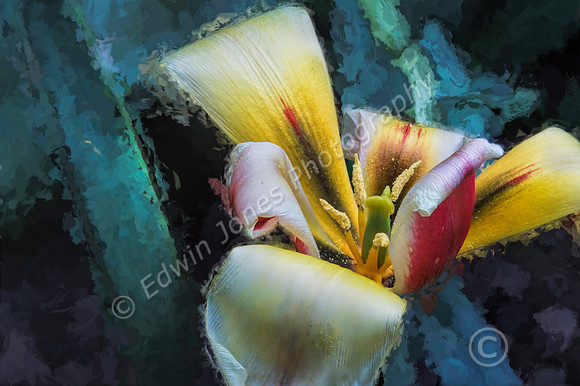
This shot was taken just over a week ago at a Macro and Flower Workshop for Bognor Regis Camera Club. One of our members, Andrew, who works at the University was able to arrange access to the Campus grounds for an evening visit. The shot was taken in a hidden away Garden by the oldest building on the Campus taking back to the 1850’s. It was a little windy but this flower was very close to the ground making it possibly the only one where focus stacking was practical. I have no idea what it is called but maybe somebody viewing this can help out.

The image is formed from a Stack of 40 images all at slightly different focus adjusted manually and stacked in Photoshop. Full details of the focus stacking technique can be found on a Blog entry from a couple of years ago, see - http://edwinjonesphotography.com/blog/2015/2/february-spring-crocus-bloom

The camera used was a Sony A550 with a Sigma 28-80 zoom with a macro function at 80mm. Taken on a Tripod with a low setting for the legs. The background was very close and dark green leaves which were a bit distracting, I got round this by selecting yje Flower which was quite easy with the quick selection tool. The Inverse selection to select the background and then apply Topaz Impression Monet Preset for a painted effect for the background. Further processing was Topaz Clarity for more detail and the dodge tool to darken down some over bright areas of the flower.