Thank you for your patience while we retrieve your images.
Taken 9-Mar-17
Visitors 43


151 of 157 photos
Thumbnails
Info
Categories & Keywords

Category:
Subcategory:
Subcategory Detail:
Keywords:london, England, uk, Britain, canary wharf, East India, station, movement, shutter speed, motion blur, lights, photography, photos, photo, picture, pictures, sony, rail, pic, dslra700, sigma, color, colour, concrete, train, underground, metro, urban, docklands, docklands light railway, DLR, dark, darkness, night, road, light trails, traffic trails, long exposure, capital, perspective, cities, wide angle, structure, londres, transport, transportation, motion, blur, speed, topaz, red%d office, skyscrapers
Photo Info

Dimensions5340 x 3560
Original file size11.6 MB
Image typeJPEG
Color spacesRGB
Date taken9-Mar-17 19:25
Shooting Conditions

Camera makeSONY
Camera modelDSLR-A700
Focal length12 mm
Focal length (35mm)18 mm
Max lens aperturef/4.5
Exposure13s at f/11
FlashNot fired, compulsory mode
Exposure bias0 EV
Exposure modeAuto
Exposure prog.Aperture priority
ISO speedISO 160
Metering modePattern
Digital zoom0x
Night Trails To The City

Night Trails To The City

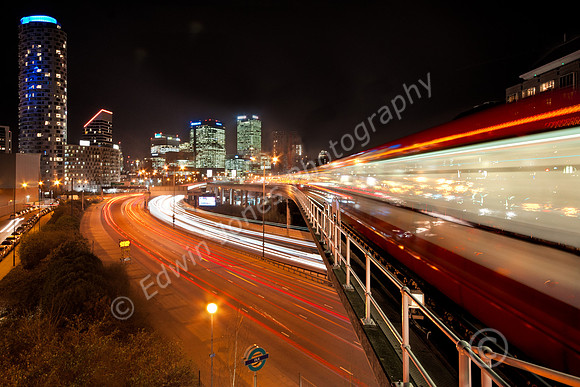
This was one of the last shots I took on my latest London trip last week. The location is East India DLR (Docklands Light Railway) station. This shot is taken from the end of the platform and just at the ideal spot and height for taking pictures is a flat topped concrete wall. No need for a tripod which might get attention from Security anyway. There is a problem taking pictures from these above street stations with vibration as trains go by. I think the concrete may have helped to absorb these. The Cityscape of Canary Wharf can be seen from other stations on the line but none better than from this one. The picture was taken with a Sony A700 with a Sigma 10-20 mm lens at 12mm.

There was a lot of processing involved in this shot. First it is a combination of 3 shots taken from exactly the same position There are 2 shots of the train, first as it passed close by and then further up the track. Then another image with more detail in the track. All images were used to build up more light trails in the road. This is very easy to do in Photoshop. Just paste in each additional image as a new layer and change the blend mode to “Lighten”. Some adjustment was done to the shadows by pasting in again one of the lighter images and using a layer mask

Additional processing included Topaz Clarity and a crop. Then a brightness adjustment layer to reduce the lights in the buildings. Then a saturation adjustment layer reds channel to bring up the reds in the train light trail. Then heal and clone tools to tidy up including getting rid of a crane.